Table of Contents — Click to Jump to Your Issue
- Gemini 3 Pro Plan Overview
- 🌟Google Account Login Steps
- 🌟Account Security and Reminders
- 🌟Usage Safety Reminders
- 🌟How to Check Your Subscription Expiry Date
- 🌟How to Change the Language
- 🌟What If the Account Asks for a Phone Verification Code Later
Gemini 3 Pro Plan Overview
We currently offer the following plans:
Gemini 3 Pro is accessed by logging in to the official website with an account provided by the platform. The expiry date may vary by 3-10 days.
12 months (dedicated account): After purchase, if the account ever loses access to the Pro subscription, we will restore the subscription on the account once, free of charge, to protect your ongoing experience. No further after-sales support is provided after that.
12 months (full after-sales support): Once the account is delivered, we provide full coverage for the entire subscription period.
Before you buy, please note: due to a policy change on Gemini's side, Gemini 3 Pro is split into two subscription plans. The only difference between them is the after-sales support.
Once the account is delivered, it belongs to you personally. We will no longer be able to perform any operations on it, so please log in and bind the account to your own mobile phone number.
🌟Google Account Login Steps
Step 1: Go to the official Gemini website
Step 2: Enter the email address and password Log in with the account provided by PremLogin, then continue to the authenticator app verification step.
Step 3: Get the verification code
- Open the authenticator website: https://2fa.run/
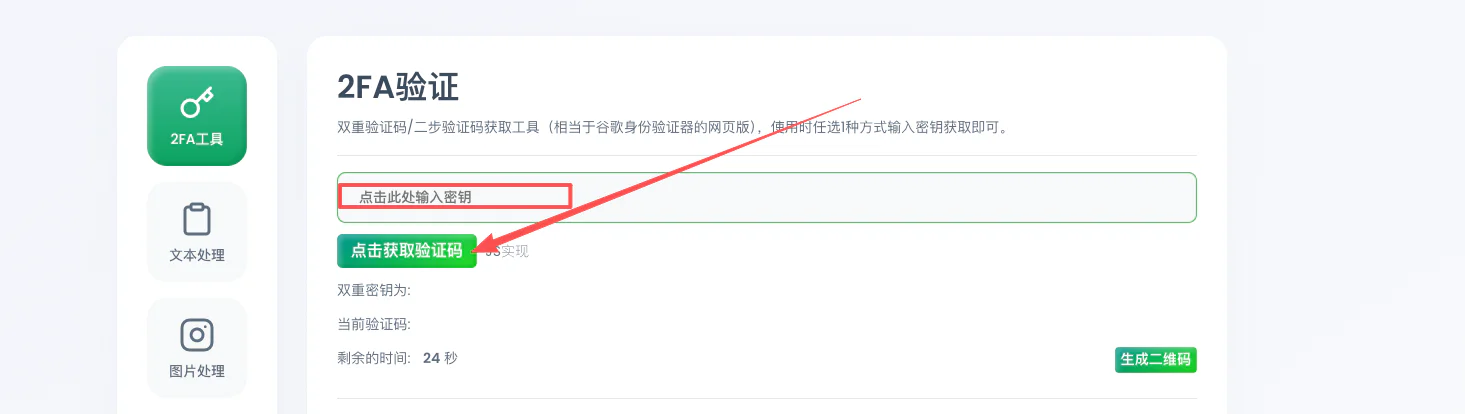
- Enter the 2FA secret key our support team gave you (demo key: 7J64V3P3E77J3LKNUGSZ5QANTLRLTKVL)
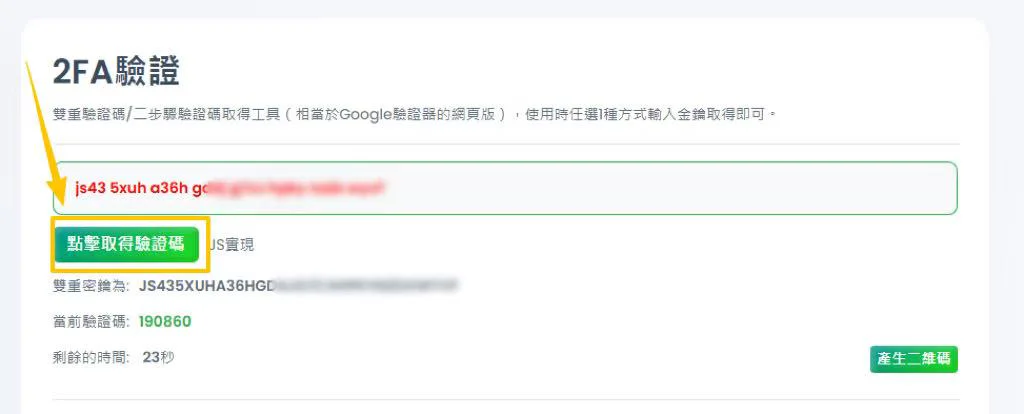
- Click to generate the verification code, then enter it on the Gemini login page —— view and copy the 6-digit code (it refreshes on a countdown timer).
🌟Account Security and Reminders
About changing account information:
- For the first week after logging in, do not change the password or log in on other devices. Doing so will trigger Google's risk-control checks, which can take 7-14 days to clear.
If the account gets flagged and you cannot use it, simply submit an appeal ("Hello, I was using my account normally and have no idea why it was suspended. Please restore my access, thank you."). Once Google approves the appeal, you can log in and use the account again.
- You only need to bind your phone number and add a backup phone number — nothing else is required.
Add a verification phone number: https://myaccount.google.com/two-step-verification/phone-numbers
The account must be bound to your own mobile phone number.
🌟How to Check Your Subscription Expiry Date
You can check it here: https://play.google.com/store/account/subscriptions?pli=1
🌟How to Change the Language
You can change it here: https://myaccount.google.com/personal-info
(Scroll down to "General preferences for the web" — there you can switch to the language you prefer.)
🌟What If the Account Asks for a Phone Verification Code Later
This does not mean your account has been suspended. It simply means something looked unusual on your end (an IP address change or similar). Google is just asking you to verify your identity — verify with the phone number bound to the account and you are good to go.